
RingTime Pro1.2.1 - Google Play
You'll be able to see results in few seconds.
Publisher Description
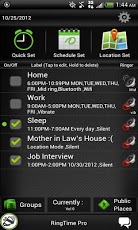
Save big this weekend with the 4th of July (Fourth, Independence Day) Sale. From $2.99 to $0.99 discount. Act Now!DescriptionAn advanced app that instantly enhances your phone's by automating your ringer capabilities. It can be used as a ring scheduler, nightly silencer or a way turn on your Bluetooth and Wifi settings by the time you get home. It can also be used to group contacts at certain ringer volumes and GPS program your ringer volume when you get a specific location.** Note this is app is the full professional version of RingTime Lite. It is recommended that you try the free version first before upgrading.Are you still manually setting your ringer at different times during the day?Do you forget to silence your phone during meetings, classes or at the movies?Are you forgetting to turn Wi-Fi on when you get home and burning data usage?For the one time price of less than a cup of coffee (or beer), you can get the following features!Features of the Pro version:1. Quick Set. Similar to the Shush! app this feature allows you to quickly set your ringer for a certain duration. Example: You want the ringer to just vibrate for 2 hours while you are at the movies.2. Schedule Set. Similar to the Ringer Scheduler app this feature allows you to schedule your phone's ringer for a later time.3. A Groups section that allows you to lump certain contacts into specific ringer categories4. GPS Location based volume settings that change the volume according to your location5. A feature that allows you to find your lost phone when it’s on silent by texting a keyword to it6. Unlimited number of events can be programmedGeneral Features:- Automate ringer volume + vibrate- Automate Airplane Mode- Automate Wifi Mode- Automate Bluetooth Mode- 1 Quick Set event can be used and constantly edited (A more advanced version of Shush!)- Main summary screen for your profile events- Label profile events- Schedule an event for a future date or use the days to repeat feature- Set alerts by taskbar and/or popup- Default Ringer setting (what to do when the profile event expires)- Change font, font color, background and header color appearance- Upload a background image or use your phone's background and show the live wallpaper- and more...To get you started: 3 default profile events have been created to get you up and running - Home, Work and Sleep.You can edit them (tap or hold the selected profile event) or create new ones.If you like this app, get the pro version for more advanced featuresFollow on Twitter @RomarcDigital.***** Please Rate It If You Like It!Keywords: shush, ringer restorer, silent, vibrate, Timeriffic, Profile Scheduler ringer mode, Ringer Scheduler, RingTime, Nap time, Snooze, baby sleep. Quick power nap, data usage, lost phone, group whitelisting and blacklisting, add free, Public Places, movies, airports, church, school, libraries.
About RingTime Pro
The company that develops RingTime Pro is Romarc Digital. The latest version released by its developer is 1.2.1.
To install RingTime Pro on your Android device, just click the green Continue To App button above to start the installation process. The app is listed on our website since 2013-07-04 and was downloaded 0 times. We have already checked if the download link is safe, however for your own protection we recommend that you scan the downloaded app with your antivirus. Your antivirus may detect the RingTime Pro as malware as malware if the download link to com.ringtimepro is broken.
How to install RingTime Pro on your Android device:
- Click on the Continue To App button on our website. This will redirect you to Google Play.
- Once the RingTime Pro is shown in the Google Play listing of your Android device, you can start its download and installation. Tap on the Install button located below the search bar and to the right of the app icon.
- A pop-up window with the permissions required by RingTime Pro will be shown. Click on Accept to continue the process.
- RingTime Pro will be downloaded onto your device, displaying a progress. Once the download completes, the installation will start and you'll get a notification after the installation is finished.
Program Details
System requirements
Download information
Pricing
Version History
version 1.2.1
posted on 2013-07-04
version 1.2.1
posted on 2013-07-04
Several fixes and updates
Disclaimer
Official Google Play Link
We do not host RingTime Pro on our servers. We did not scan it for viruses, adware, spyware or other type of malware. This app is hosted by Google and passed their terms and conditions to be listed there. We recommend caution when installing it.
The Google Play link for RingTime Pro is provided to you by apps112.com without any warranties, representations or guarantees of any kind, so access it at your own risk.
If you have questions regarding this particular app contact the publisher directly. For questions about the functionalities of apps112.com contact us.
